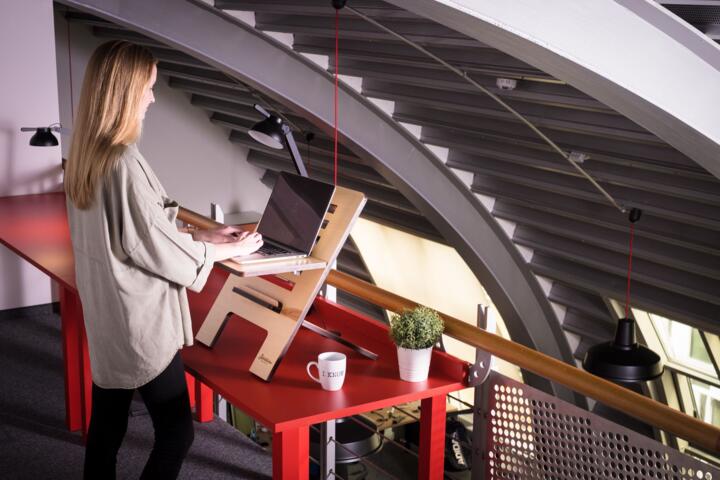
Standing Desks: the Basics
A standing desk is a work surface designed to let you work while standing instead of sitting. Many models are height-adjustable so you can switch positions during the day. In practice, the main change is not “standing all day,” but replacing long uninterrupted sitting with shorter bouts of standing and movement.
Two evidence-based facts help frame expectations. First, prolonged sitting is associated with higher cardiometabolic risk in observational studies, even after accounting for some activity levels; the mechanism is thought to involve reduced muscle contractions that normally help move glucose and triglycerides. Second, a randomized trial in office workers found that adding a sit-stand intervention reduced sitting time and increased standing time, while effects on pain outcomes were mixed across studies and often modest.
For everyday examples, consider a person who typically sits for 6–8 hours at a desk. With a sit-stand setup, they might stand for 15–30 minutes at a time, then sit again, repeating this pattern. Another example is a call-center worker who alternates between standing and sitting every 20–40 minutes to reduce stiffness during long shifts.
Common Pain Points
People often treat standing desks as an all-or-nothing switch. Standing continuously for hours can overload the feet, calves, and lower back because the body needs ongoing muscle activity to maintain posture. That overload can show up as aching in the heels, tired legs, or increased low-back discomfort, especially if the desk height forces the shoulders up or the wrists bent.
Another frequent mistake is poor height matching. If the monitor is too low, the neck flexes forward; if it is too high, the neck extends. If the keyboard is too high, the shoulders elevate and the wrists extend, which can aggravate tendon irritation. These issues are mechanical and can worsen symptoms even when sitting time decreases.
Some users also underestimate how movement matters. Standing still reduces the benefit of muscle contractions compared with standing with frequent weight shifts, short steps, or periodic stretching. In other words, a standing desk can reduce sitting time, but it does not automatically create the movement pattern that many people need to feel better.
There are also biological trade-offs. Sitting tends to increase hip flexion and can reduce blood flow in the legs during long uninterrupted periods. Standing increases demand on postural muscles and can increase pressure through the feet and lower limbs. Alternating positions can reduce the time any one tissue is under the same load.
Real-world situations that trigger problems include tight deadlines that lead to long uninterrupted standing, home-office setups with laptops that force poor screen height, and shoes that lack cushioning during long standing bouts.
Solutions and Recommendations
Start with a time plan
Use a gradual schedule rather than switching to long standing blocks immediately. A practical starting point is to alternate every 20–30 minutes for the first week, then adjust based on comfort. This approach targets the main goal—reducing uninterrupted sitting—while giving your feet, calves, and back time to adapt.
In practice, you can set a timer on your phone or computer to prompt position changes. Many people find that the first days feel awkward because muscles and connective tissues are learning a new loading pattern.
What to look for: mild leg fatigue that settles after sitting is usually less concerning than persistent pain in one spot. If discomfort escalates over days, the schedule may be too aggressive.
Dial in desk and monitor height
Set the desk so elbows rest near your sides with forearms roughly parallel to the floor during typing. For the monitor, aim for a viewing angle that keeps the neck close to neutral, with the top of the screen near eye level for many people. Keyboard and mouse height matter as much as desk height because wrist extension and shoulder elevation can drive pain.
In practice, you may need a laptop stand, an external keyboard, and an external mouse to achieve proper alignment. If you must use a laptop, raising it with a stand and using an external keyboard helps reduce neck flexion.
Relevant tools include a simple measuring tape, a chair height reference for seated posture, and a mirror or phone camera to check neck angle. If you notice shoulder shrugging or wrist bending, adjust before increasing standing time.
Use footwear and foot support
Foot and calf discomfort is common when standing surfaces are hard and shoes provide limited cushioning. Supportive footwear with adequate arch support and shock absorption can reduce pressure on the heels and forefoot during longer bouts.
Some people benefit from an anti-fatigue mat, which adds slight compliance and encourages micro-movements. The mat should not force you to stand with a tilted pelvis; if it changes your stance, it may worsen low-back symptoms.
What it looks like in practice: you can stand with comfortable weight distribution, and your legs feel tired rather than sharply painful. If you develop numbness, tingling, or pain that radiates, stop and reassess setup and standing duration.
Move while standing
Standing desks work best when they reduce static posture. Add small movements: shift weight side to side, take short steps to reach items, and change stance every few minutes. These actions increase muscle contractions in the legs and can reduce the “stuck” feeling that comes from standing still.
In practice, you can place frequently used items slightly off to one side so you naturally step or reach. A standing meeting can include brief walking between points rather than staying fixed in one position.
Realistic outcome expectations: many users notice less leg heaviness and fewer stiffness complaints within days to a couple of weeks when they add movement, even if total standing time stays moderate.
Plan breaks for symptoms
If you feel foot pain, calf tightness, or low-back discomfort, shorten standing bouts and increase sitting time temporarily. The goal is to keep the pattern tolerable while you refine posture and movement. Pain that changes your gait or causes you to “protect” one side is a sign to pause and adjust.
In practice, you can use a symptom-based rule: if discomfort rises above a mild level during a standing block, switch positions sooner. Keep the monitor and keyboard alignment consistent so you are not trading one problem for another.
When to seek professional advice: persistent or worsening pain, numbness, weakness, or symptoms that spread down the leg or arm warrant medical evaluation.
Consider ergonomics for typing and mouse use
Standing changes your baseline posture, so typing mechanics can shift. Keep wrists neutral, avoid resting forearms on sharp desk edges, and use a mouse that fits your hand size to reduce grip strain. If you use a trackpad, check that it does not force your wrist into extension.
In practice, a keyboard tray is not always needed, but external keyboard and mouse placement often improves alignment. If you notice finger or wrist pain, reduce standing time and reassess reach distances.
Tools include an external keyboard with adjustable height, a mouse with appropriate grip style, and a wrist rest that supports without bending the wrist.
Track sitting and standing time
Use a simple log for one to two weeks to see how your schedule affects symptoms. Record approximate time spent sitting, standing, and moving, plus where discomfort occurs. This helps separate “too much standing” from “standing with poor alignment.”
In practice, you can use a notes app and jot down entries after work. If you have a wearable, it may estimate posture time, but treat it as a rough guide rather than a medical measurement.
What to look for: improvement usually comes from reducing long uninterrupted sitting and maintaining neutral posture, not from maximizing standing minutes.
Case Examples
Example 1: neck stiffness after switching
A remote worker replaced a laptop desk with a sit-stand setup. After several days, they noticed neck stiffness and headaches that worsened during standing. The desk height was correct for typing, but the monitor sat too low when standing, increasing forward neck flexion.
They raised the monitor and used an external keyboard and mouse so the screen stayed at a consistent eye-level angle. They also shortened standing bouts to 15–20 minutes while they adjusted. Over the next week, neck discomfort decreased, while standing time gradually increased without returning headaches.
Example 2: foot pain from long static standing
An office worker used a standing desk for most of a shift because it felt like the “healthier” option. They developed aching in the heels and tight calves, especially during long calls when they stayed still. The desk height was slightly high, causing shoulder elevation and increased muscle tension.
They lowered the desk to align elbows near their sides, added an anti-fatigue mat, and used a timer to switch positions every 25–30 minutes. They also added brief steps during breaks and between calls. Foot discomfort improved when standing time became intermittent and movement increased.
Standing vs Sitting Checklist
| Decision point | If you choose a sit-stand plan | If symptoms worsen | What to adjust first |
|---|---|---|---|
| Primary goal | Reduce long uninterrupted sitting by alternating positions | Stop increasing standing time and reassess posture and movement | Desk height, monitor height, and keyboard/mouse reach |
| Standing duration | Start with short blocks (about 15–30 minutes) and build gradually | Shorten blocks or return to more sitting temporarily | Standing schedule and use of timers |
| Posture quality | Keep neck neutral and wrists neutral during typing | Look for compensations like shoulder shrugging or forward head | Monitor placement and external input devices |
| Leg comfort | Use supportive shoes and shift weight while standing | Address foot pain early; avoid long static standing | Footwear, mat choice, and movement frequency |
| Tracking | Log time and symptom location for 1–2 weeks | Use the log to identify patterns tied to posture or duration | Change one variable at a time |
Common Mistakes
- Standing through pain. Mild fatigue can be expected, but sharp pain, numbness, or worsening symptoms are signals to reduce standing time and adjust setup.
- Using a laptop at the wrong height. Laptop screens often sit too low, which increases neck flexion during standing and can worsen headaches or neck stiffness.
- Maxing out standing time. Longer standing blocks do not automatically improve outcomes; many people do better with intermittent standing and frequent position changes.
- Ignoring keyboard and mouse reach. Poor reach can increase shoulder tension and wrist extension, which may trigger hand or forearm discomfort.
- Standing still for long calls. Static standing reduces the benefit of muscle activity; weight shifts and short steps help.
- Assuming the mat fixes everything. Anti-fatigue mats can help some people, but they can also change stance mechanics if the desk height or posture is off.
FAQ
How long should I stand during work?
Start with short blocks such as 15–30 minutes and alternate with sitting. Adjust based on comfort, posture quality, and symptom response rather than aiming for maximum standing time.
Can a standing desk worsen back or foot pain?
Yes. Standing continuously can overload the feet, calves, and lower back, especially with poor desk height, unsupportive footwear, or long periods of static posture.
Do standing desks help circulation?
Alternating positions can reduce the time legs spend in one fixed position. Standing still for long periods may provide less benefit than standing with weight shifts and brief movement.
What setup changes matter most for neck and shoulders?
Monitor height and keyboard/mouse placement matter most because they determine neck angle and shoulder elevation. Using external input devices with a raised screen often improves alignment compared with a low laptop.
Should I avoid standing if I have a medical condition?
Some conditions require individualized guidance. If you have persistent pain, numbness, weakness, or symptoms that worsen with standing, consult a clinician before changing your work posture.
Author's Insight
Standing desks change the pattern of loading across the spine, hips, and lower limbs by reducing uninterrupted sitting and introducing intermittent standing. The strongest practical lesson is that posture quality and movement frequency determine whether standing helps or irritates tissues. Evidence from office-based trials generally shows reduced sitting time with mixed or modest effects on pain outcomes, which fits the idea that ergonomics and gradual adaptation drive results. A cautious approach—adjusting monitor and keyboard height, using supportive footwear, and alternating positions—tends to minimize common problems like neck strain and foot pain.
Key Takeaways
- Standing desks work best as a sit-stand system that reduces long uninterrupted sitting, not as a reason to stand all day.
- Desk and monitor height, keyboard/mouse reach, and neutral wrist and neck posture often determine comfort more than the desk itself.
- Foot and leg discomfort can happen; supportive footwear, anti-fatigue mats (when they fit your stance), and frequent weight shifts help.
- Track your time and symptoms for 1–2 weeks and change one setup variable at a time.
- Seek medical advice if you have persistent or worsening pain, numbness, weakness, or radiating symptoms, since work-posture changes should not mask serious problems.